.svg)
Use the Create Apwide Booking action in Jira Automation to create a new booking in a booking flow.
This action helps you automate booking creation based on Jira events, such as a work item transition. You can use it to create one or multiple bookings and link them to a work item.
Requirements
-
Access to Jira Automation
-
Familiarity with Jira Automation concepts (triggers, actions, smart values)
-
An existing booking flow in the Booking App
Add the Create Apwide Booking Action
-
Create or edit an automation rule in Jira Automation.
-
Select a trigger for the rule (for example, Work item transitioned).
-
Select Add component or Add to branch.
-
Search for and select Create Apwide Booking.
-
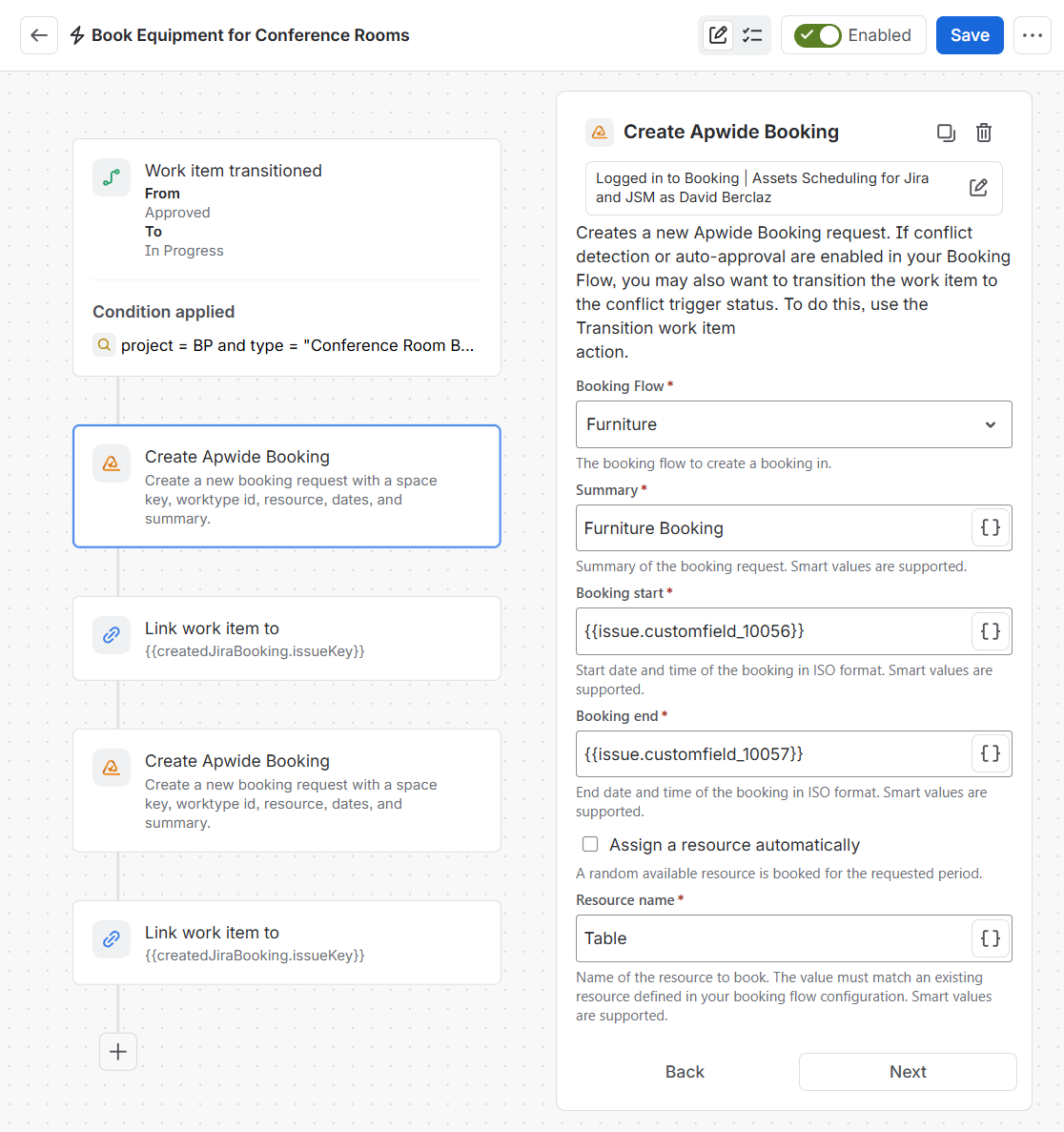
Configure the fields:
-
Booking Flow: The booking flow to create a booking in.
-
Summary: The summary of the booking request. Smart values are supported.
-
Booking start: Start date and time of the booking in ISO format. Smart values are supported.
Example:{{now.plusBusinessDays(9)}}or{{issue.customerfield_XXXXX}} -
Booking end: End date and time of the booking in ISO format. Smart values are supported.
Example:{{now.plusBusinessDays(15)}}or{{issue.customerfield_XXXXX}} -
Assign a resource automatically: a random available resource is booked for the requested period (option available for advanced edition)
-
Resource name: The resource assigned to the booking. Must exist in the Booking Flow.
-
-
Save and enable the automation rule.
Result:
A booking is created automatically when the rule is triggered.
Verify the Automation Execution
To verify that the booking was created:
-
Open the automation rule audit log.
-
Review the execution details and actions performed.
-
Open the related work item.
-
Check the activity or linked bookings.
Example: Automatically Book Equipment
A company manages conference room bookings.
-
A conference room is booked through a work item.
-
The work item transitions to the Book Equipment status.
-
A Jira Automation rule is triggered.
-
The rule creates bookings for each required equipment using the Create Apwide Booking action.
-
The equipment bookings use the same dates as the room booking.
-
The bookings are linked to the original work item.
Result:
All related bookings are visible from the same work item. Users can track their status and take action if needed.